> For the complete documentation index, see [llms.txt](https://docs.pockethrms.com/llms.txt). Markdown versions of documentation pages are available by appending `.md` to page URLs; this page is available as [Markdown](https://docs.pockethrms.com/faqs/cloud-portal/analytics/report/payroll/payslips.md).
# Payslips
### 1. How to Export annual payslip?
To export annual payslip kindly follow path below:
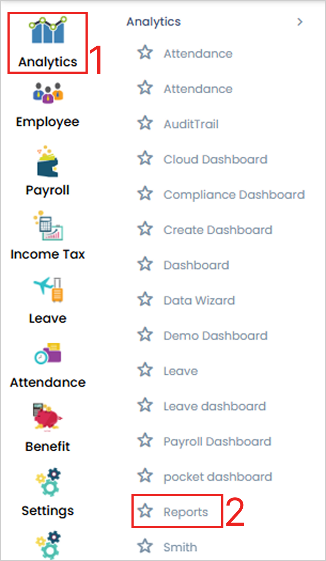
**Path:** Login cloud portal > Go to Analytics > Reports > payroll > Payslips > Select category > enable check box of consolidated payslip > select Annual from drop down > click on download.
**Step 1**: Log into the cloud portal, go to the ‘Analytics’ menu and click on the ‘Reports’ submenu.
**Step 2**: Under the ‘**Payroll**’ tab click on the ‘**Payslip**’ subtab. Select the ‘**Category**’, ‘**Month/Year’**, **enable check box of consolidated payslip** and select **Annual** from drop down, then click on the **‘Download’** button and the payslips will be downloaded.

**Link:**
For any queries, contact
### 2. Require last 6-month salary slip of a specific employee?
**Path**: Cloud portal>Analytics>Reports>Payroll>Payslip>Employee Code>select required details>Download>Send Email
**Step 1**: Log into the cloud portal, go to the ‘Analytics’ menu and click on the ‘Reports’ submenu.
**Step 2**: Under the ‘Payroll’ tab, click on the ‘Payslip’ subtab.
**Step 3**: Select employee from the ‘Employee Code’ field. Then select ‘Category’, ‘Month/Year’ and other options as required and click on the ‘Download’ button. The payslips of employee will be downloaded accordingly.
**Step 4:** Click on the ‘Send Email’ button to send the payslip over email to employee.
**Link**:
For any queries, contact