> For the complete documentation index, see [llms.txt](https://docs.pockethrms.com/llms.txt). Markdown versions of documentation pages are available by appending `.md` to page URLs; this page is available as [Markdown](https://docs.pockethrms.com/hr-and-admin-portal/cloud-configuration/analytics/report/payroll/fnf-slips-in-bulk-to-the-employees.md).
# FnF Slips in Bulk to the Employees
### FnF Slips in Bulk to the employees
### How to send FnF Slips in Bulk to the employees?
### a) Process to Download the FnF Slip:
**Path: Cloud -> Analytics -> Reports -> Payroll -> FnF Slip > Select the applicable categories > Select the required employees > Select the FnF Settlement processed date range >Select the FnF Applied in Month and Year > Select the Business Unit to group the FnF Slips accordingly >Click on ‘Download’ to download the FnF Slips**
**Step 1:** Log in to the **Cloud portal**.
**Step 2:** Navigate to the **‘Analytics’** module from the main menu, Select **‘Reports’**.
**Step 3:** Click on the **‘Payroll’** section, and then select **‘FnF Slip’**.
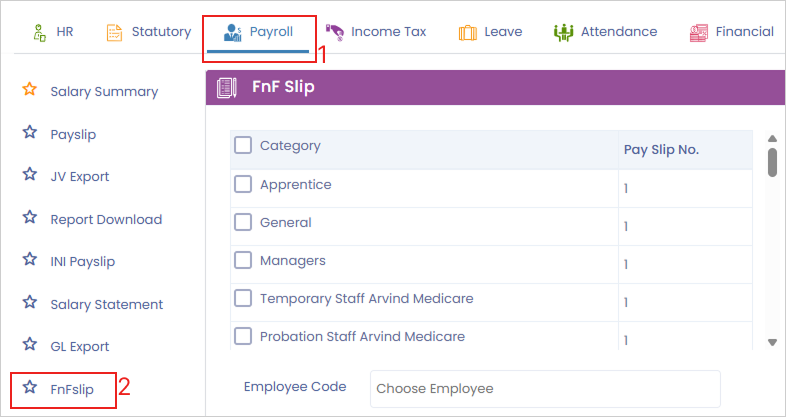
**Step 4:** Select the applicable employee **categories** from the provided dropdowns or lists.

**Step 5:** Choose the specific **employees** for whom you need the settlement slips, or leave the **employees code field blank** if you want to **choose it for all employees**.
or

**Step 6:** Select the **FnF Settlement processed date range, for** which date you want the FnF report, to filter the appropriate records.

**Step 7:** Select the specific **FnF Applied in Month and Year** corresponding to the settlement.

**Step 8:** Select the appropriate **Business Unit** to group the generated FnF slips logically.

**Step 9:** Click on the **‘Download’** button to export and save the FnF slips to your device.

### b) Process to Send Email of FnF slips to the employees:
**Path: Navigate to Cloud -> Settings > Organization -> Email Templates -> Full and Final Slip and verify the email template. This email will be sent to the selected employees along with their FnF Slip > Click on ‘Send Email’ to email the FnF Slips directly to the selected employees.**
**Step 1:** Log in to the **Cloud portal** and navigate to the ‘**Settings**’ menu, select **‘Organization’** module from the main menu.
**Step 2:** Select **‘Email Templates’** to access the list of automated communications.
**Step 3:** Click **‘Ctrl F’** and search **‘FullandFinalSlip’ folder** to open and **verify the email template**. Make sure the messaging is correct, as this exact text will accompany the FnF slip attachment.


**Step 4:** Once you are satisfied with the template, return to the FnF Slip report section where you need to fill in all details. **(As mentioned in point (a) of how to download FnF payslips)**
**Path:** Cloud > Analytics > report > payroll >**FnF Slip > Select the applicable categories > Select the required employees > Select the FnF Settlement processed date range >Select**the FnF Applied in Month and Year > Select the Business Unit to group the FnF Slips accordingly >Click on ‘Download’ to download the FnF Slips

**Step 5:** Click on the **‘Send Email’** button to automatically dispatch the final settlement slips and the verified email template to the selected employees.
For any queries, contact