> For the complete documentation index, see [llms.txt](https://docs.pockethrms.com/llms.txt). Markdown versions of documentation pages are available by appending `.md` to page URLs; this page is available as [Markdown](https://docs.pockethrms.com/pocket-hrms-2.0-mobile-app/leave-and-attendance/request/manual-attendance-entry.md).
# Manual Attendance Entry
### How to Update Manual Attendance Entry from Pocket HRMS 2.0 Mobile App?
**Path**: Login to mobile app of Pocket HRMS 2.0 > click on 3 horizontal lines (Hamburger menu) > Leave > Request > Manual Attendance Entry > Tick the employees you want to update > Fill the shift time > type of leave > update
**Step 1:** Log in to the Pocket HRMS 2.0 mobile app and click on the **3 horizontal lines** **(Hamburger menu)** **on the top left.**
**Step 2:** Select the **‘Leave’** module from the menu to see the available requests Click on **‘Request’.**
**Step 3:** Select the **'Manual Attendance Entry'** option from the request list.
**Step 4:** **Tick the checkboxes next to the specific employees** you wish to update.
**Step 5:** Fill in the **required shift time and select the appropriate type of leave from dropdown**.
**Step 6:** Click on **'Update'** to finalize the attendance records.
### Filter Button
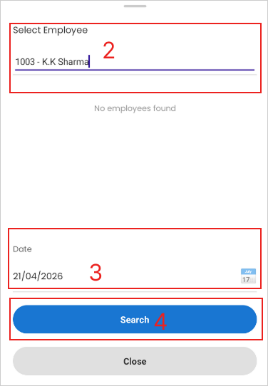
Enables to filter out employees for whom you want to do manual attendance entry.
Click on filter button > Type employee name > Select date > Search
{% embed url="" %}
For any queries, contact