> For the complete documentation index, see [llms.txt](https://docs.pockethrms.com/llms.txt). Markdown versions of documentation pages are available by appending `.md` to page URLs; this page is available as [Markdown](https://docs.pockethrms.com/product-updates/updates-2026/august-2026.md).
# August 2026
### **August 2026**
We are thrilled to present our Monthly Update, with enhanced user-friendly tools to elevate your HR experience. Our commitment to innovation and efficiency drives us to bring you seamless updates that transform your HR processes. For the month of **August 2026**, we have the following enhancements.
### **Asset Notification Settings**
**Asset Notification Settings** let you control email alerts for asset assignment and de-assignment. Assigning or de-assigning an asset sends an immediate email, with a separate email per asset when several are handled in one transaction. If multiple assets are assigned or de-assigned to an employee in a day, one consolidated email goes out via the daily scheduler instead. Notifications can go to the employee, reporting manager, HRs, Admins, selected employees, or specific email IDs, and email templates can be edited or restored to default, giving real-time visibility into asset movements without manual tracking.
### **People Connect – Profile Card Privacy Controls**
HR can now choose to hide **Work Email**, **Personal Email**, **Work Mobile**, and **Personal Mobile** independently from employee profile cards in People Connect on the ESS Portal. The setting applies uniformly across all cards shown in People Connect, giving HR control over contact-detail visibility organisation-wide without configuring it employee by employee.
### **Daily Survey Submission Report**
HR and Admin users now get a **Daily Survey Submission Report** — one consolidated email listing all employees who submitted a survey the previous day, sent automatically at **12:00 AM** with a clickable Excel file link. No email is sent if there are no valid survey submissions in the reporting period, which reduces email clutter compared to individual submission alerts.
### **KPI Report Enhancement**
The **KPI Report** now shows each employee's Key Result Area (**KRA**, listed as Sub-Parameter) and **KPI** (Question) rows alongside their weightage percentages, along with **KPI Status** (such as KPI Approved or Employee Submitted) and Manager Remarks for each entry. This gives Managers and HR a clearer view of how an appraisal score breaks down, instead of just the final score.
### **PMS Analytics Dashboard**
The newly Introduced **PMS (Performance Management System) Analytics Dashboard,** gives role-based views under **My Dashboard**, **Manager Dashboard**, and **Admin/HR Dashboard**.
* **Employees** can track their appraisal journey, approved KPIs, pending activities, performance scores, and goals.
* **Managers** get visibility into team appraisal progress, pending reviews, employee eligibility, bottlenecks, and action items.
* **Admin and HR** users can view organisation-level performance analytics, grading distribution, top performers, and employees needing improvement, along with auto-generated performance summaries and visual analytics for quicker decisions.
### **Roster Shift Count and Working Minutes**
Two new payroll components, **Roster Shift Count** and **Roster Working Minutes**, capture the shift count and working minutes as assigned through Roster by the manager. You can map these fields in **payroll formulas,** letting compensation tie directly to roster-assigned shift data without manual reconciliation.
### **OT Working Hours Configuration**
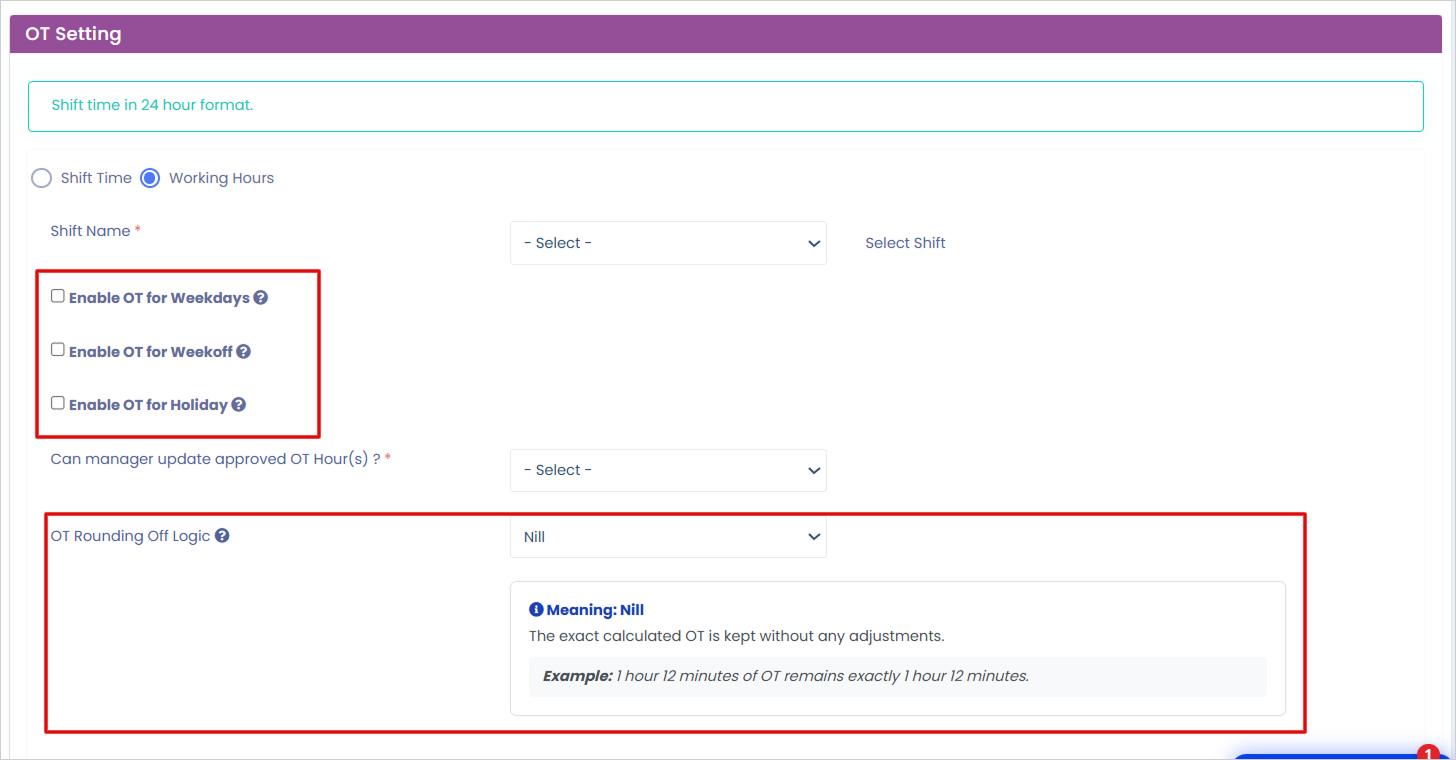
You can now configure OT Working Hours separately for Weekdays, Week-Offs, and Holidays, each with its own minimum and maximum OT limits. For Week-Off and Holiday OT, choose between **From Start** and **Considering After Shift Hours** calculation methods. OT can be rounded using **Standard, Lower Value, Higher Value, or Nil options**, with contextual help and validations to guide setup, and a controlled Delete option for saved configurations. Existing OT setups and Comp-Off functionality stay unchanged unless you update them, giving Payroll and HR precise, day-type-specific control over overtime calculations.
### **Attendance Regularization Without a Punch Entry**
You can now submit an **Attendance Regularization** request even when there is no punch entry for the day, adding both the In and Out date and time yourself. Previously, at least one punch entry was required, and you could only update the missing one. This removes the need to involve IT or HR when you miss punching in and out entirely.
### **Candidate Digital Signing of Offer Letters on Career Portal**
Candidates can now digitally sign **Offer Letters** directly on the **CSS Career Portal**, using the same configuration as the existing HR Letter signing setup. On **View Offer**, candidates get the same signing options employees already have for their HR Letters. Once accepted, the offer is signed and the signed offer letter is saved to the candidate's profile — speeding up offer acceptance and removing manual print-sign-scan steps for Candidates and Recruiters.
### **Job Identification Types**
You can now publish a job as **Public (Career Portal)**, open to anyone; **Internal Job Posting (IJP)**, visible only to internal employees; or **Invite Only**, shared privately via a link or QR code. This gives Recruiters more control over exactly who can see and apply for a job.
### **HR Resignation Withdrawal Rules**
Resignation withdrawal by HR is now configurable instead of following a single fixed rule. You can allow withdrawal **at any stage before employee separation**, **after manager approval**, or **after departmental approval** (the current/Previous Behaviour). This gives HR the flexibility to match company policy instead of being tied to one fixed approval stage.
**For any queries, contact** [**support@pockethrms.com**](mailto:support@pockethrms.com)
.png?alt=media&token=cf3a8390-d7b8-4466-b1ad-1da6676c1ed3)
.png?alt=media&token=472532cc-93cc-4ef3-a17a-6621c5e6223d)
.png?alt=media&token=5eaa5b4e-eb6f-4932-a770-d45c28bba244)
.png?alt=media&token=a93f9769-888c-400e-a555-1575965ef84b)
.png?alt=media&token=b620b754-19ce-4898-9ef7-4c2cbc763ca0)
.png?alt=media&token=d5ac1c5e-1626-4b0a-b9d0-211373816f32)