> For the complete documentation index, see [llms.txt](https://docs.pockethrms.com/llms.txt). Markdown versions of documentation pages are available by appending `.md` to page URLs; this page is available as [Markdown](https://docs.pockethrms.com/product-updates/updates-2026/march-2026.md).
# March 2026
### Product Update March 2026
We are thrilled to present our Monthly Update, with enhanced user-friendly tools to elevate your HR experience. Our commitment to innovation and efficiency drives us to bring you seamless updates that transform your HR processes. For the month of March 2026, we have the following enhancements.
### Restricted Leave in Notice Period
* This feature limits how many leaves an employee can take after resignation.
* Once an employee resigns, the system calculates the Last Working Day (LWD) based on the notice period.
* Employees can take only the allowed number of leaves during this period.
* Any leave request beyond this limit will be blocked, but leaves outside the notice period are allowed.

### Improved Leave History Report
The Leave History Report is now updated to include leaves applied by both employees (ESS) and Admin/HR (Cloud). It also shows the requested date and user login details for better tracking.
**Key Benefits:**
* Includes leaves applied by Admin/HR from the Cloud.
* Shows requested date for all leave entries.
* Displays user login details for better tracking.
* Improves overall visibility of leave records.
### Leave Menu Renamed to "Leave and Attendance"
The Leave menu in ESS is now renamed to **"Leave and Attendance"** to better reflect its features.
**Key Benefits:**
* The new name clearly represents both leave and attendance activities.
* No changes in functionality; only the name is updated.
**Availability:**
* Available on ESS Web.
* Mobile App update coming soon.

### Configuration Limits for Leave, Attendance & Payroll
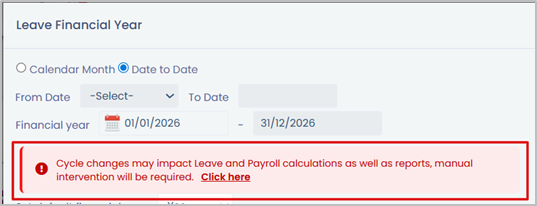
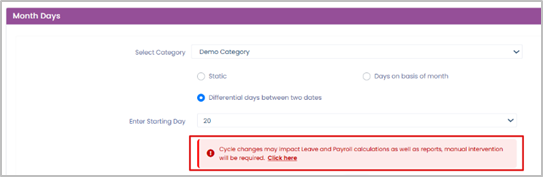
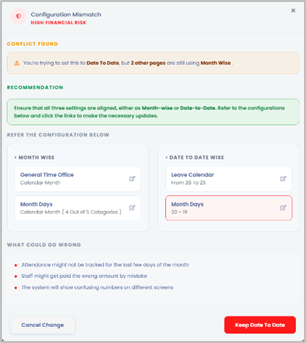
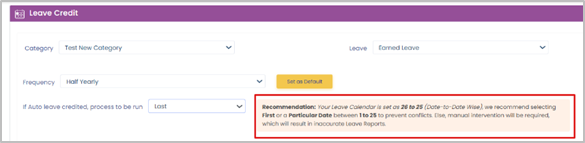
To ensure accurate leave, attendance, and payroll processing, all settings like Leave Calendar, Leave Credit, Time Consolidation, and Payroll Month Days must be aligned. Mismatched settings can lead to incorrect leave deductions (LOP) and payroll errors.
**Key Points:**
* **Recommended:** Keep all settings aligned (Month-wise or Date-to-Date) for accurate results.
* **Not Recommended:** Mismatched settings may cause incorrect deductions.
* Manual changes are required if mismatched settings are used.
### Auditor Mobile Punch Enhancement (WFH & Audit Mode)
* A new mobile attendance feature is introduced for Auditors with two modes: **WFH (2 punches)** and **Audit Mode (4 punches)**.
* Users start in WFH mode and can switch to Audit Mode before punching. Each punch uses face recognition and location tracking.
* The system adjusts the punch flow based on the selected mode and tracks working hours.
* All data is available in a Custom Punch Report with access for Admin, Manager, and Employee.
**Benefit:** Improves flexibility, accuracy, and visibility of audit activities.
### Daily Attendance Report for Managers
The Daily Attendance Report is an automated email sent to managers with a summary of their team’s attendance for the day. It includes an Excel report with key attendance details.
**Report Includes:**
* Employees who logged in late
* Absent employees
* Employees on leave (with leave type)
* Employees who worked overtime
* Employees with only one punch (incomplete data)
* Employees who did not complete working hours
\*\*Note:\*\*To enable this feature, the company must share the preferred time to send the report along with company details.

### Decimal Values in Ratings
Previously, ratings were limited to whole numbers, which restricted evaluation flexibility. With this update, users can now use half-step decimal ratings (e.g., 1.5, 2.5), allowing for more precise and accurate performance assessments.
**Key Benefits:**
* Allows decimal ratings like 1.5, 2.5, etc.
* Improves accuracy and flexibility in appraisals.
* Can be configured in Appraisal Settings.
### PMS Display Banner
The PMS Info Banner feature allows organizations to display important messages at the top of appraisal and approval screens. It helps communicate key instructions and updates directly to users during the appraisal process. This ensures that Employees, Managers, and Admins are well-informed at every stage. By showing messages on relevant screens, it reduces confusion and improves overall clarity. It also helps in guiding users to take the right actions on time.
**Key Benefits:**
* Shows important messages for better communication
* Ensures visibility on relevant screens
* Highlights key appraisal instructions
**How it Works:**
* Can be enabled for selected screens (e.g., Appraisal, Review)
* Users can add and format messages
* The banner appears at the top for selected users

### PMS Overall Report
The PMS Consolidated Report is a new Excel report that combines data from all appraisal stages into one. It is available to Employees, Managers, and Admins, offering a complete view of the appraisal process.
**Key Benefits:**
* Shows all appraisal stages in a single report
* Available for all user roles
* Easy access through ESS
* Helps track employee performance and progress easily


### File Upload at Stage Level
The File Upload feature, which was earlier limited to the question level, is now enhanced to support uploads at the stage level. This allows users to upload files at the end of the form, offering more flexibility in appraisal and performance processes.
**Key Benefits:**
* Enables file uploads at the stage level
* Allows uploads at the end of the form, not just per question
* Improves ease of use for admins and employees
### New Hire Alert Notification
The New Joinee Notification feature sends an email to all HR users when a new employee is added. It informs them about the PMS setup and prompts them to complete the required configuration.
**Key Benefits:**
* Sends automatic email alerts to HR users on new employee addition
* Email template can be customized as per requirements
* Helps HR ensure timely completion of onboarding steps
### Custom KPI Weightage Setup
Earlier, KPI weightage was fixed and could only be assigned as a default value through the employee KPI flow. This limited the flexibility to adjust weightage based on the importance of each KPI. With the new update, employees can now assign custom weightage to individual KPIs, allowing a more flexible and tailored approach to performance evaluation. This ensures that each KPI is weighted appropriately based on its relevance and impact.
Additionally, the system provides an option to restrict the assigned weightage based on the overall KRA (Key Result Area) or sub-parameter weightage, helping maintain consistency and alignment with organizational goals.
**Key Benefits:**
* Allows employees to assign custom weightage to each KPI
* Provides flexibility to align KPIs with specific goals
* Ensures weightage control based on KRA/Sub-parameter limits
### CTC Template Duplication Across Companies
A new feature allows HRs to copy the complete CTC template, including components, structure, and formulas, within the same company or across different companies.
This reduces time and effort by removing the need to create templates from scratch.
HRs can easily copy and then modify the template as per their requirements, making the process more efficient.
### Revoke Offer Feature
The Revoke Offer feature allows HRs and recruiters to withdraw offers sent to candidates when required. This helps manage situations like no response from candidates or changes in hiring requirements, ensuring better control over the recruitment process.
**Key Points:**
* HRs can revoke offers sent to candidates
* A remark is required before revoking the offer
* All actions are recorded in the candidate’s timeline for transparency
* Helps manage offer changes or cancellations efficiently
### Digital Signature for HR Letter Acknowledgement
A new feature has been introduced to enable HR Letter Acknowledgement with digital signature capture, allowing organizations to manage document acknowledgements in a secure and paperless manner. HR can now send letters directly through the system and track employee acknowledgements efficiently.
**Key Points:**
* HR can send letters (policies, notices, declarations, etc.) directly from the system
* Option to mark letters as “Acknowledgement Required” with a disclaimer
* Employees can view, acknowledge, and digitally sign documents via ESS
* Multiple signature options: Draw, Type, or Upload
* Status updates to “Acknowledged” after completion, with downloadable signed PDF
* HR can track and download employee-wise acknowledged documents
* Ensures compliance, audit trail, and paperless documentation
**Link:**
### Increment Letter with CTC Breakdown (Old, New & Difference)
A new Increment Letter template has been introduced to help HRs clearly show salary changes by displaying old, new, and difference CTC values. This improves transparency and makes it easier for employees to understand their increment details.
**Key Points:**
* New template includes Old, New, and Difference salary placeholders
* Helps present salary changes in a clear and structured format
* HRs can preview the letter by selecting employee, month, and year
* System auto-generates a PDF with actual values
* Letter can be issued through the Employee Document screen
### Payroll-Independent Appointment Letter Generation
The Appointment Letter feature has been enhanced to allow HRs to create and issue letters without processing payroll. This makes it easier to generate appointment letters for new employees.
**Key Points:**
* Payroll processing is no longer required to issue appointment letters
* HRs can create and issue letters directly for new employees
* Supports employee and payroll-related placeholders
* Allows basic calculations (\*, +, -, /) for flexible value display
* HR can select employee, month, and year to auto-fill values
* Preview option available to verify the letter before issuing


### Enhanced Exit Letter Settings
The Exit Letter feature has been enhanced to provide more flexibility and control over the exit communication process. HRs can now decide both the timing of when the exit letter should be generated and the recipient to whom it should be sent. This ensures better alignment with company policies and improves communication with employees during the exit process.
**Key Points:**
* HR can choose when to trigger the letter (on separation or after Full & Final)
* Option to send the letter to official or personal email ID
* Earlier, letters were triggered only at separation with fixed email settings
* Provides more flexibility to align with company policies and communication needs
For any queries, contact