> For the complete documentation index, see [llms.txt](https://docs.pockethrms.com/llms.txt). Markdown versions of documentation pages are available by appending `.md` to page URLs; this page is available as [Markdown](https://docs.pockethrms.com/feature-guides/statutory-bonus-guide.md).
# Statutory Bonus Guide
### Statutory Bonus – Step-by-Step User Guide
Statutory Bonus is a mandatory benefit under the [Payment of Bonus Act, 1965](https://clc.gov.in/clc/acts-rules/payment-bonus-act-0#19.%20Time-limit%20for%20payment%20of%20bonus) for eligible employees. Pocket HRMS automates this through a 0-click auto bonus workflow—once configured, the system calculates monthly bonus accruals, stores them for the full Calculation Period, and pays them automatically in the chosen payout month or during Full & Final Settlement.
How Monthly Bonus Works
* Monthly accrual uses the default statutory formula: (Earned Basic + Earned DA) × 8.33%
* This formula is configurable based on company policy.
* Accruals are stored every month until payout.
* If an employee leaves before the payout month, the system uses the stored accruals to automatically pay the applicable bonus in Full & Final Settlement.
One-Time Setup Steps (At a Glance)
1. Enable Statutory Bonus – Activate the feature.
2. Select Accrual Component – Used for monthly bonus calculation.
3. Define Calculation Period – Months during which bonus accrues.
4. Select Payout Component – Used to pay the total bonus.
5. Choose Payout Month – Month in which bonus will be released.
### How to Configure and Manage Statutory Bonus?
Follow the steps below to configure statutory bonus:
**Step 1:** Statutory Bonus Setup To configure the bonus settings, you must complete the following actions:
* Enable Statutory Bonus Calculation to activate the feature.
* Select the Accrual Component to determine how the bonus is accumulated.
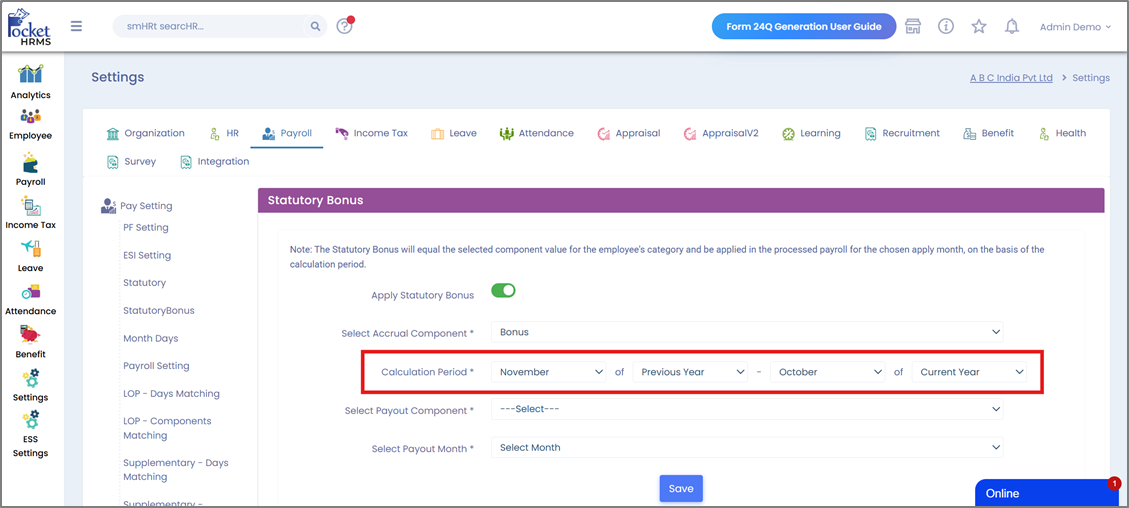
* Define the Calculation Period to establish the specific timeframe for the bonus cycle.
* Select the Payout Component to designate the salary head for the payment.
* Select the Payout Month to schedule when the bonus will be disbursed.
**Step 2:** Accrual in Monthly Salary
**Step 3:** Bonus in the Payout Month
**Step 4:** Statutory Bonus in Full & Final Settlement
**Explanations:**
### Step 1: Statutory Bonus Setup
Path: [Cloud → Settings → Payroll → Pay Settings → Statutory Bonus](https://cloud.pockethrms.com/Settings/Employee/Index?module=payroll\&submodule=StatutoryBonus)
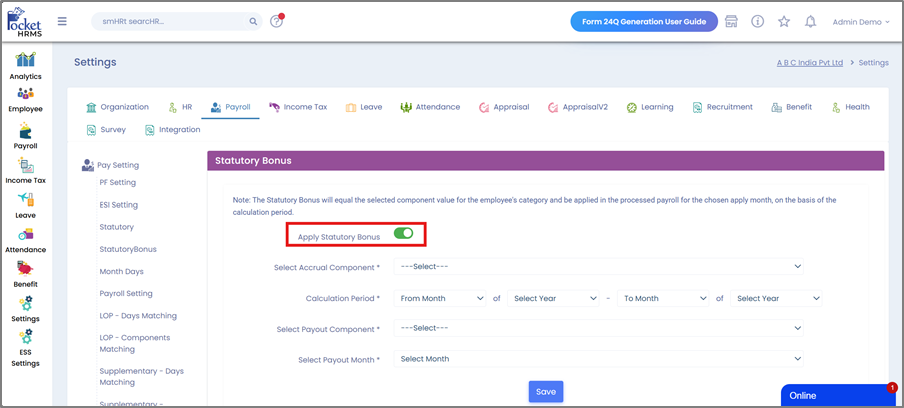
Here you will find the configuration panel used to define how the Statutory Bonus will be accrued and paid.
**Enable Statutory Bonus Calculation:**
· Turn ON the toggle “Apply Statutory Bonus” to begin configuration.
· This enables the system to start calculating monthly bonus accruals based on your settings.
· Please note that the effect will take place from the next payroll after enabling the setting.
**Select the Accrual Component:**
Choose the component that will be used to accrue monthly Statutory Bonus values.
Important Notes
* This component must be created in:\
Path: [Cloud → Settings → Payroll → Payroll Components → Earnings](https://cloud.pockethrms.com/Settings/Employee/Index?module=payroll\&submodule=salarycomponent)
* It must have NO default behaviours enabled, since it is only meant to accrue the amount and not pay it.
**Accrual Formula Configuration**
· Standard Statutory Bonus formula used in this guide: **(Earned Basic + Earned DA) × 8.33%**
· This is **configurable** as per your organization’s policy.
· Example configuration: **(EARNEDBASIC + EARNEDDA) \* 0.0833**
· Configure the formula at:\
Path: [Cloud → Settings → Payroll → Salary Structure → Earning Formula](https://cloud.pockethrms.com/Settings/Employee/Index?module=payroll\&submodule=SalaryStructure)
· Apply it to **all relevant categories** so the system can:
· Compute the bonus **monthly**
· **Store it as accrual** (not included in Gross)
· **Pay it only in the payout month**.
**Define the Calculation Period**
· Select the months for which bonus will accrue.
· Example: *Nov (Previous Year) to Oct (Current Year)* → *Nov 2024 to Oct 2025*.
· The system will auto-calculate monthly bonus for all payrolls processed within this period.
**Select the Payout Component:**
This component is responsible for paying out the statutory bonus by summing all accrued values during the set calculation period (refer example period).
**Required Behaviours for the Payout Component**
Enable the following ONLY:
* Include Gross Pay
* Tax
* Include for ETDS
**Payout Component Calculation Settings** (for all the relevant categories)
* Type: Direct
* Rounding: 1 Rupee
This ensures accurate summation during the payout month.
**Select the Payout Month**
· Choose the month in which the total bonus accrued will be paid.
· Example: If bonus accrues from Nov (Previous Year) to Oct (Current Year), it will be paid in Nov of the Current Year.
· As per [The Payment of Bonus Act, 1965](https://clc.gov.in/clc/acts-rules/payment-bonus-act-0#19.%20Time-limit%20for%20payment%20of%20bonus), bonus is payable within eight months from the close of the accounting year.
· After selecting all fields, click Save to finalize the configuration.
### Step 2: Accrual in Monthly Salary
To verify monthly auto-accrual of the bonus, open the employee salary page:\
Path: [Employee Profile → Payroll → Salary Details](https://cloud.pockethrms.com/Employee/employee/Profile?employeeID=7731\&module=profile\&empstatus=1)
You will see the **Accrual Component** showing the monthly computed bonus amount (as seen in the example below).\
\
Please note:
· It is **NOT added to Gross**
· It is **NOT paid monthly**
· It is **ONLY stored as an accrual**
This continues automatically for every month in the Calculation Period.
### Step 3: Bonus in the Payout Month
In the selected pay-out month, the system automatically:
· Displays the **Payout Component** (e.g., Statutory Bonus, as seen in the example below)
· Shows the **total accumulated bonus amount** for the entire period
· Adds the amount to:
o **Gross Pay**
o **Net Salary (paid to employee)**
o **Taxable Income & ETDS**
No manual action is required.
### Step 4: Statutory Bonus in Full & Final Settlement
If an employee resigns before the payout month, Pocket HRMS will still pay them the bonus for the months they have completed in the accrual cycle.
**Example:**\
Employee resigns in June → completed 8 months → system auto-calculates bonus for those 8 months and displays it as **FnF Bonus** on the Full & Final Settlement screen.
Automatic FnF Bonus Calculation
* System sums all accrued bonus months up to the exit date.
* Shows the total as FnF Bonus during FnF processing (as seen in the example below).
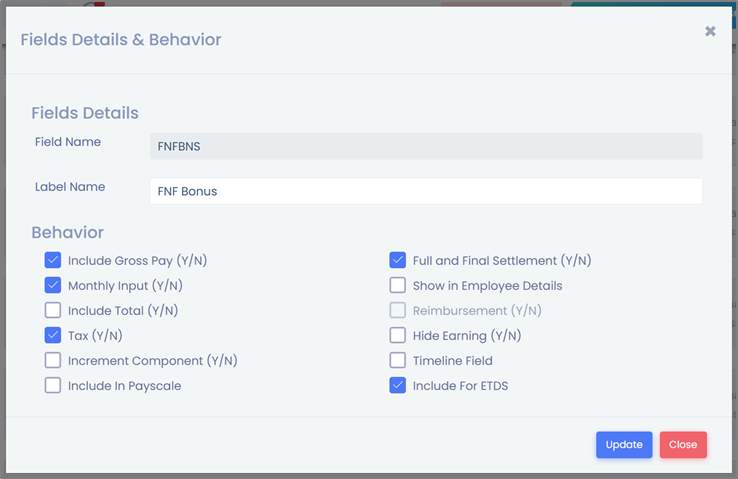
**FnF Bonus Component Requirements**
Create a new component with:
· **Field Name:** `FNFBNS`
· **Label Name:** **FnF Bonus** (label can be renamed later, but field name must remain `FNFBNS`)
Enable these behaviours:
· Monthly Input
· Full and Final Settlement
· Tax
· Include Gross Pay
· Include for ETDS
Calculation Settings (for all the relevant categories):
* Type: Direct
* Rounding: 1 Rupee
**Scenario 1: Employee is Active in the Payout Month**
**Bonus Calculation Period:** November 2024 → October 2025**Accrual Formula:** (Earned Basic + Earned DA) × 8.33%**Bonus Payout Month:** November 2025
**What is happening here?**
* Every month, the system calculates bonus based on that month’s Earned Basic + Earned DA.
* The monthly bonus amount is **stored as accrual** and **not paid** during the year.
* In the payout month (Nov 2025), the system **adds up all accrued months** and pays the full amount in salary.
* Since the employee is active, the bonus is paid through **regular monthly salary**.
| **Month** | **Earned Basic** | **Earned DA** | **Accrued Bonus** | **Paid Out Bonus** |
| --------- | ---------------- | ------------- | ----------------- | ------------------ |
| Nov-24 | 50000 | 25000 | **6248** | |
| Dec-24 | 50000 | 25000 | **6248** | |
| Jan-25 | 50000 | 25000 | **6248** | |
| Feb-25 | 50000 | 25000 | **6248** | |
| Mar-25 | 50000 | 25000 | **6248** | |
| Apr-25 | 50000 | 25000 | **6248** | |
| May-25 | 50000 | 25000 | **6248** | |
| Jun-25 | 55000 | 27500 | **6872** | |
| Jul-25 | 55000 | 27500 | **6872** | |
| Aug-25 | 55000 | 27500 | **6872** | |
| Sep-25 | 55000 | 27500 | **6872** | |
| Oct-25 | 55000 | 27500 | **6872** | |
| Nov-25 | 55000 | 27500 | 6872 | **78096** |
**Scenario 2: Employee Exits in June 2025 (FnF Scenario)**
**Bonus Calculation Period:** November 2024 → October 2025**Accrual Formula:** (Earned Basic + Earned DA) × 8.33%**Bonus Payout Month:** November 2025
**What is happening here?**
* Employee exits before the payout month.
* As per Bonus Act, the employee must still receive bonus for the months worked.
* System automatically **totals accruals from Nov 2024 to June 2025** only.
* The amount appears as **FnF Bonus** during Full & Final Settlement.
* No values beyond June are considered because the employee has not worked in later months.
| **Month** | **Earned Basic** | **Earned DA** | **Accrued Bonus** | **Paid Out Bonus** |
| --------- | ---------------- | ------------- | ----------------- | ------------------ |
| Nov-24 | 50000 | 25000 | **6248** | |
| Dec-24 | 50000 | 25000 | **6248** | |
| Jan-25 | 50000 | 25000 | **6248** | |
| Feb-25 | 50000 | 25000 | **6248** | |
| Mar-25 | 50000 | 25000 | **6248** | |
| Apr-25 | 50000 | 25000 | **6248** | |
| May-25 | 50000 | 25000 | **6248** | |
| Jun-25 | 55000 | 27500 | **6872** | **50608** |
For any queries, contact